We had dynamic data masking on the national ID column in a Fabric Warehouse. Users could still see every digit.
That sentence opened a few weeks of work that ended somewhere I did not expect: not with a cleverer mask, but with a different model of who is allowed to hold a workspace role at all. This post is that story, told as the design it produced. If you are about to load your first sensitive table into Fabric, read it first. If you already have, read it anyway; the retrofit is where we spent most of the time.
1. Two queries to run before you believe anything
The first lesson was embarrassing and useful. Before asking why masking was not working, we should have asked whether it existed. The catalog answers that in one query:
SELECT t.name AS table_name, c.name AS column_name, c.masking_function
FROM sys.masked_columns c
JOIN sys.tables t ON c.object_id = t.object_id
WHERE c.is_masked = 1;
Zero rows. Whatever had been done in the portal earlier, no column in that warehouse carried a mask. Masking in a Fabric Warehouse is a T-SQL fact or it is nothing:
ALTER TABLE dw.Customer
ALTER COLUMN NationalId ADD MASKED WITH (FUNCTION = 'partial(0, "XXXXX", 4)');
partial(prefix, padding, suffix) keeps the leading and trailing characters you specify and shows the literal padding in between, so a nine-digit identifier renders as XXXXX6789. Use partial() rather than default() for anything where the last four digits carry business meaning; replace a mask by dropping it first.
The second query checks that nobody has been handed the key:
SELECT pr.name, pe.permission_name, pe.state_desc
FROM sys.database_permissions pe
JOIN sys.database_principals pr ON pe.grantee_principal_id = pr.principal_id
WHERE pe.permission_name = 'UNMASK';
Zero rows is the right answer here. Then, and only then, test from a real Viewer account. Not your own. Administrators testing their own masking almost always see plaintext and conclude the feature is broken, which brings us to the actual problem.
2. The enforcement matrix
With masks confirmed in the catalog and no UNMASK grants, our test users still saw plaintext because they were workspace Members. That is not a bug. Admin, Member and Contributor roles receive CONTROL permission on a Fabric Warehouse by design, so they can view unmasked data. OneLake security has similar elevated-role behavior for local tables, with documented exceptions for shortcut-backed data and user-identity scenarios.
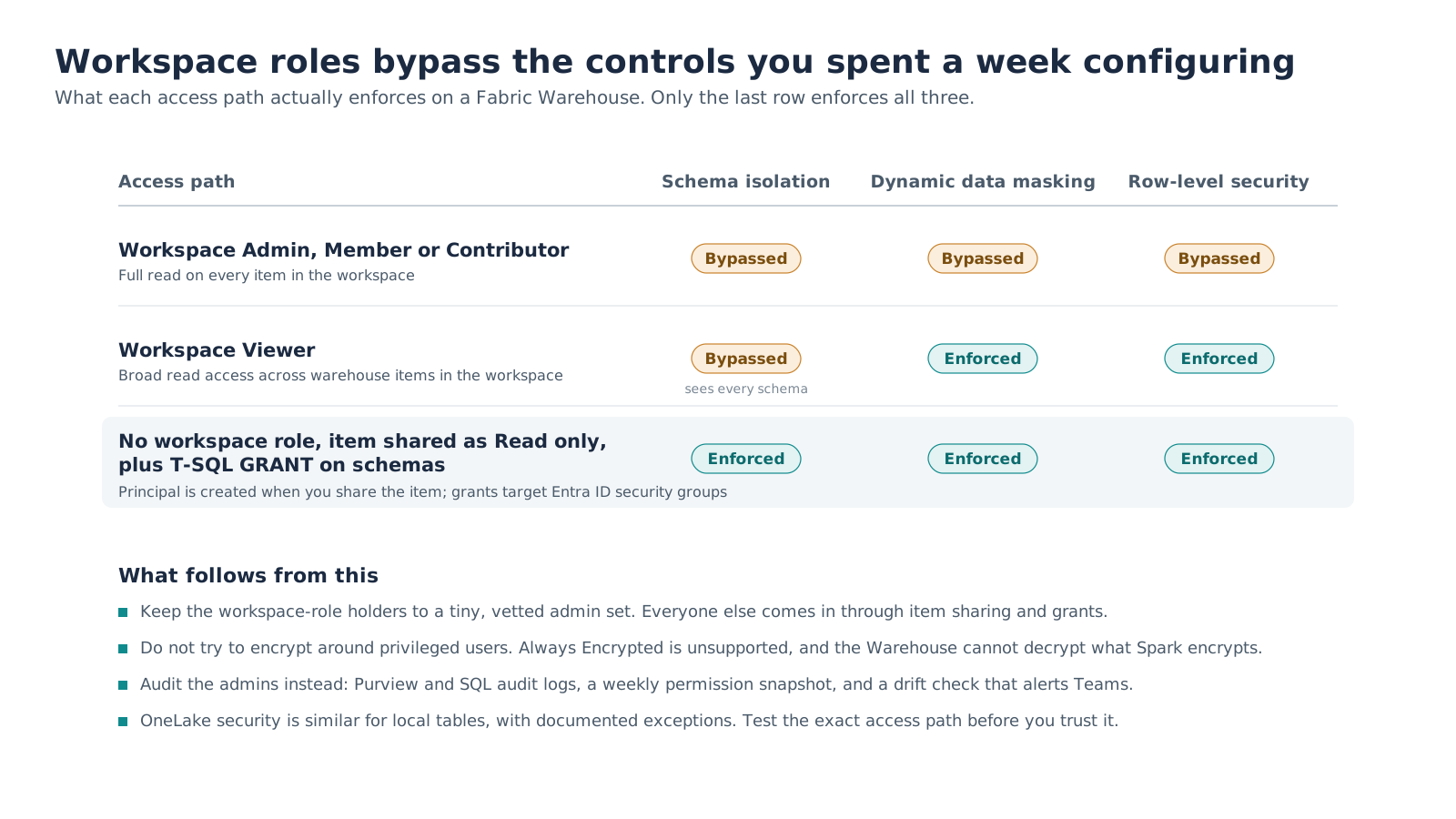
Figure 1. Dynamic data masking, row-level security, column-level security and OneLake security are all bypassed by the top three workspace roles.
Three rows, three very different outcomes.
Admin, Member and Contributor receive elevated access to every Warehouse item in the workspace and can view unmasked data. If ordinary consumers hold these roles, the Warehouse-level controls described here will not give you the separation you intended.
Viewer is where many teams land, and it half works. Masking and row-level security are enforced, but Viewer grants broad read access across Warehouse items in the workspace. If your goal is "everyone reads everything, but sensitive columns are masked," Viewer can fit. If you also need schema-level isolation between audiences, it does not.
No workspace role at all, with the Warehouse shared to the user's Entra group using item-level Read permission only and access granted in T-SQL, is the configuration we use for granular isolation, masking and row filters together. Two mechanics catch people here. Explicit CREATE USER is not supported in Fabric Warehouse; running GRANT or DENY creates the database user automatically, while item-level Read permission is still required to connect. Grants should target Entra ID security groups rather than individuals, for reasons the last section makes concrete.
A few edges worth knowing before someone reports them as bugs. Masks flow through views but do not follow the data into a CTAS copy or a downstream lakehouse shortcut, so a masked source with an unmasked copy next to it is a leak. And any Power BI model or pipeline that connects with a fixed identity holding elevated permissions shows every downstream reader what that identity can see.
3. The encryption detour
Our requirements looked reasonable on paper: authorized users see sensitive data, developers see only their own records, administrators are blocked, and everything stays queryable from Power BI. The matrix above makes the third requirement impossible with native controls, so we did what the requirement seemed to demand and designed around cryptography.
The design was sound in isolation. Encrypt sensitive columns before ingest with AES-256-GCM, wrap the data key with a key-encryption key in Azure Key Vault, store only ciphertext in the lake. Administrators see bytes. We posted the approach to the Fabric community to check our assumptions, and the answers confirmed both the approach and the wall it hits: Always Encrypted with secure enclaves is not supported in the Fabric Lakehouse or Warehouse, so there is no engine-side decryption for authorized readers.
That pushes decryption downstream, and downstream is where it dies. The Warehouse cannot decrypt ciphertext produced by Python in a notebook; DECRYPTBYKEY exists in the Fabric SQL Database but not in the Warehouse engine. Power Query M has no real cryptographic functions, and in any case Direct Lake semantic models bypass Power Query entirely, so the moment you add a decrypting transform the table falls back to Import or DirectQuery and you have given up the reason you chose Direct Lake. The remaining option was an Azure SQL or Function-based reveal layer sitting beside the platform, which is a second system to secure, pay for and explain.
At that point the right question was asked out loud: is this too complex? Yes. Cryptography was solving for "no administrator can ever see this," and no regulated firm I could find operates a lakehouse that way. They operate a governed-admin model.
4. The governed-admin model
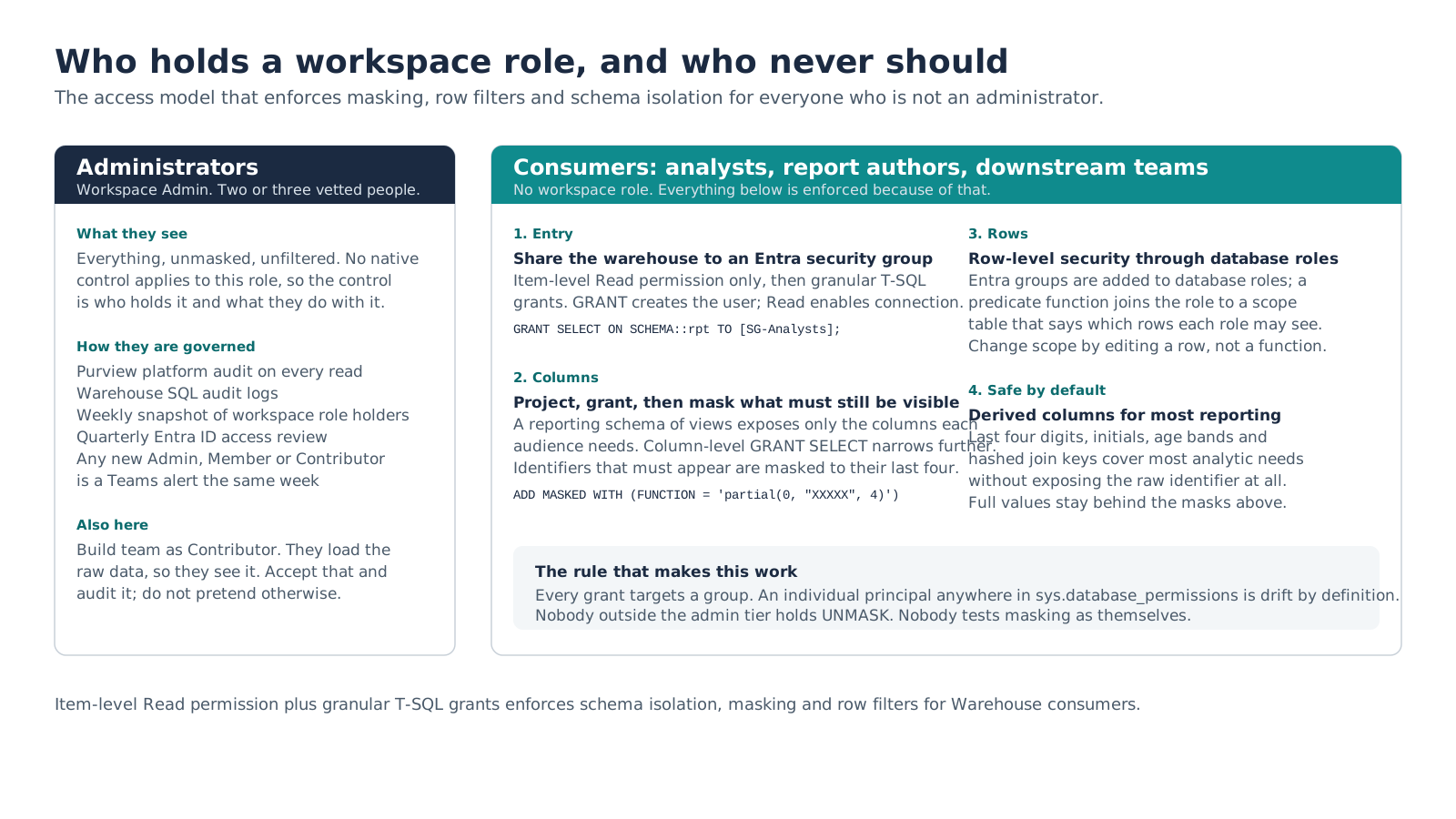
Figure 2. Only the left card holds a workspace role, and that card is small, named and audited.
The model has two tiers that see raw data and one that never does.
Administrators hold the workspace Admin role. There are two or three of them, they are named, and they are watched: Fabric activity records capture platform actions, Warehouse SQL audit logs capture configured database events, and a weekly snapshot records who holds the role so any addition triggers an alert. The build team sits alongside them as Contributor. They load the raw files, so they will see the raw data; pretending otherwise is how you end up in the encryption detour. Accept it and audit it.
Consumers hold no workspace role. The warehouse is shared to their Entra group as Read only, then four layers do the work:
- Schema grants in T-SQL decide which schemas each group can read at all.
- A reporting schema of views projects only the columns each audience needs, with column-level
GRANT SELECTnarrowing further where a view is too coarse. - Dynamic data masking with
partial()on identifiers that must still appear, so the last four digits are visible and nothing else. - Row-level security through database roles. Entra groups are added as members of database roles, and a predicate function joins the caller's role to a scope table in the control schema that lists which rows each role may see. Changing someone's scope is an
INSERT, not a redeploy of the function.
Most reporting never touches a raw identifier at all. Last four digits, initials, age bands and hashed join keys are precomputed as safe derived columns in the curated layer, and the full values stay behind the masks for the small set of users with a real need.
5. Security as metadata
The model above is a few dozen grants, a handful of database roles and a scope table. On day one it fits in a script. By month three, after two schemas, three new groups and a reorganization, nobody can say with confidence what the live permissions are, and a hand-typed GRANT to a colleague who needed something urgently is sitting in sys.database_permissions with no record of who approved it. The platform already runs jobs, load plans and data quality rules from metadata; security got the same treatment.
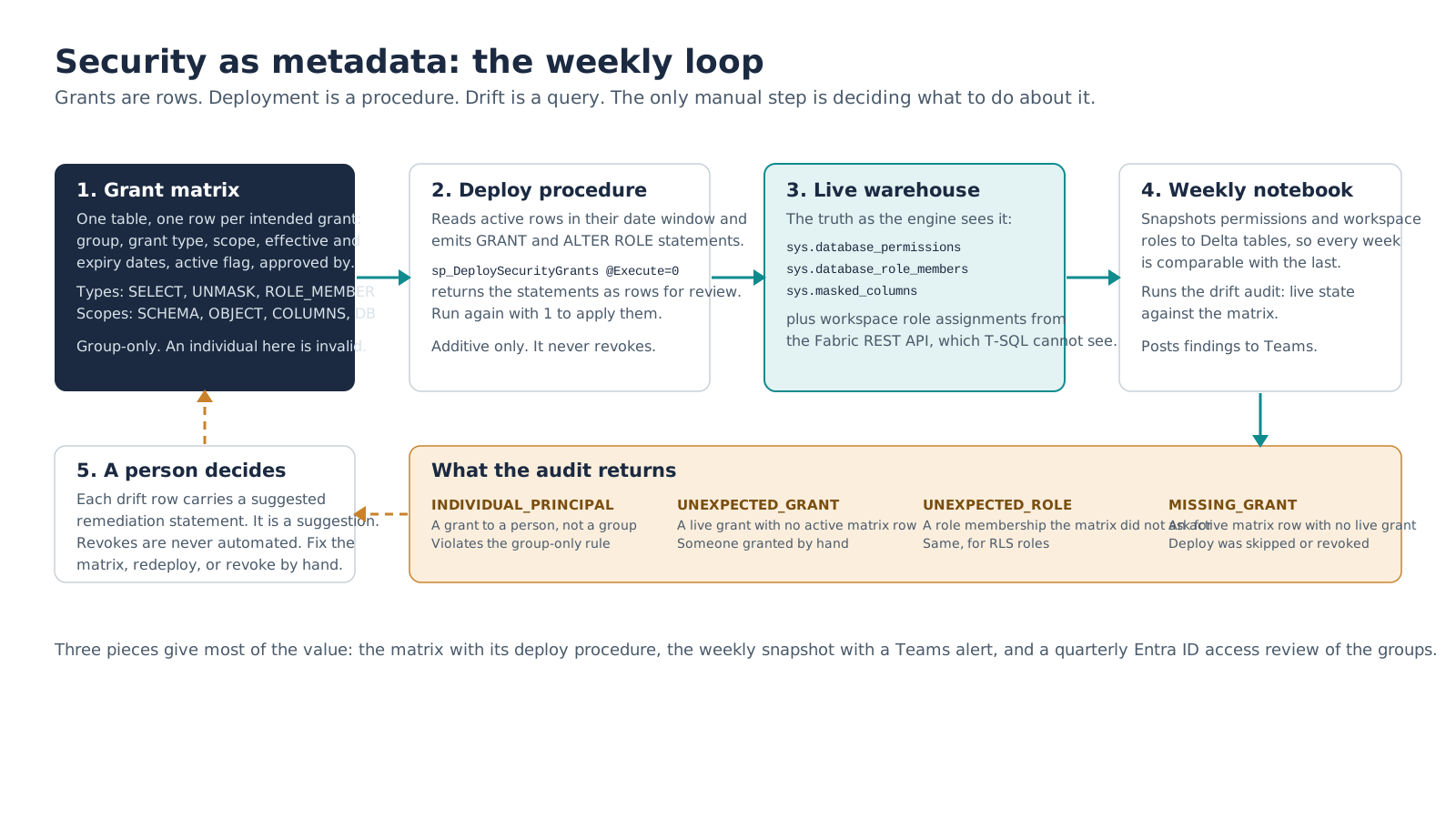
Figure 3. Grants are rows, deployment is a procedure, drift is a query. The only manual step is deciding what to do about it.
The grant matrix is one table with one row per intended grant: the Entra group, a grant type (SELECT, UNMASK, ROLE_MEMBER), a scope (SCHEMA, OBJECT, COLUMNS, DATABASE), effective and expiry dates, an active flag and who approved it. It is group-only by design. An individual principal in this table is invalid; an individual principal anywhere in the warehouse is drift.
The deploy procedure reads active rows inside their date window and builds the GRANT and ALTER ROLE ... ADD MEMBER statements. Called with @Execute = 0 it returns the statements as rows for review, which matters because PRINT truncates long batches and because a grant script deserves eyes before it runs. Called with @Execute = 1 it applies them. It is additive only: it never revokes, and it raises an error rather than guessing if it meets a grant type it does not recognize.
The drift audit compares sys.database_permissions and sys.database_role_members against the matrix and returns one row per discrepancy in four types. INDIVIDUAL_PRINCIPAL is any grant to a person rather than a group. UNEXPECTED_GRANT is a live grant with no active matrix row, which is someone granting by hand. UNEXPECTED_ROLE is the same for role membership. MISSING_GRANT is an active matrix row with no live counterpart, which means a deploy was skipped or something was revoked. Each row carries a suggested remediation statement, and the word that matters is suggested: revokes are never automated. A person reads the finding, fixes the matrix or the warehouse, and the next week's run confirms it.
The weekly notebook ties it together. It snapshots every explicit permission and role membership from the Warehouse into a Delta table, pulls the workspace role assignments through the Fabric REST API (T-SQL cannot see who is an Admin or Member) into a second table, runs the drift audit, and posts findings through an approved Teams workflow or notification channel. Secrets stay in Key Vault. Because every week's snapshot is kept, the question "who could read this table in March?" has an answer.
If you build only three things, build these: the matrix with its deploy procedure, the weekly snapshot with the Teams alert, and a quarterly Entra ID access review of the consumer and privileged groups. Privileged identity management and entitlement workflows can wait until the consumer population justifies them.
6. Before the first sensitive table lands
The checklist we now run, in order.
- Name the administrators. Two or three people, in a dedicated Entra group, and nobody else in Admin, Member or Contributor except the build team.
- Decide the consumer groups and create them in Entra before any table exists. Grants will target these and only these.
- Turn on Purview platform audit and Warehouse SQL audit logs now, while there is nothing to audit. Retrofitting audit onto a populated warehouse means a period you cannot account for.
- Design the reporting schema, the masks and the row-scope table for the first sensitive dataset before loading it. Loading first and securing second is what we did, and it cost more than the original build.
- Share the Warehouse to consumer groups with item-level Read permission only, then deploy the granular SQL grants from the matrix.
- Test every control from a real account in each consumer group. Screenshots of the masked result from a Viewer-equivalent account are worth keeping; they are the evidence you will want later.
- Schedule the weekly snapshot and drift audit before go-live, so the first report is a clean baseline.
None of this is exotic. All of it depends on accepting the thing the matrix says plainly: in Fabric, security is not a property of the data. It is a property of who holds a workspace role, and that is a decision, not a setting.
Microsoft documentation referenced
What's next
Next in the series: the control plane. The job table, load plans with phases, dependency resolution, batch control, and the generic engine that runs a hundred warehouse jobs off a few dozen columns of configuration.
Turn these lessons into a practical implementation plan.
Meridian Software Inc helps growing organizations assess workloads, design governed architectures, migrate data, and build Microsoft Fabric solutions that teams can operate with confidence.